
Shows
A show contains everything you prepare for a performance: the patch, the cues, the presets, the layouts, the window arrangement… A show is a single .esl file. Only one show is open at a time.
The Shows window
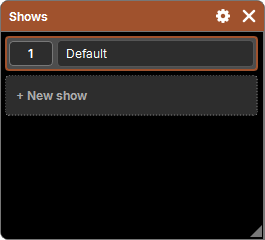
"Add a window" → Setup → Shows lists the shows of the folder, with the open show highlighted.
| Gesture | Effect |
|---|---|
| press a show's button | opens it (the open show is closed) |
| + New show | creates an empty show, "Show 1", "Show 2"… (it is not opened) |
| type in its name | renames it (the file too) |
| Copy then a show | makes a copy of it, "My show (copy)"; the open show can be copied |
| Delete then a show | moves it to the trash; refused for the open show |
The open show can be renamed too. A refused name goes back to the old one: empty, already taken, more than 64 characters, a space at the start or the end, or a character not allowed in a file name (\ / : * ? " < > |).
Saving
There is no Save button: every change is written to the show file the moment you make it. You can close the software at any time without losing anything.
If a write fails (disk full, USB stick removed, file no longer accessible), the Show not saved popup warns you: your last changes may be lost on closing. Make a copy of the show as soon as possible.
At startup
The software reopens the last open show, with its windows as you left them. If it has disappeared, it opens the first one in the list; if there is none, it creates the Default show.
If the remembered show cannot be opened (damaged file, locked, read-only, or created by a newer version of the software), the Show not opened popup says so, and another show is opened instead: the software never starts without a show.
If some cues could not be read back (damaged file), the Damaged cues popup lists them: what is missing stays empty, the rest of the show is untouched. Storing one of these cues again replaces what was damaged.
Files
| What | Where |
|---|---|
| the shows | Documents\E&S Lighting\Shows\<name>.esl |
| the trash | Documents\E&S Lighting\Shows\Corbeille (the show name followed by the date and time) |
- Back up: copy the
.eslfile (with the software closed, or with Copy in the Shows window for a safe copy while it is open). - Move to another computer: copy the
.eslinto the Shows folder of the other computer, it appears in the Shows window. - Recover a deleted show: take it out of the Corbeille (trash) folder and rename it
<name>.esl.
What the show keeps, what the computer keeps
In the show (.esl) | On the computer |
|---|---|
| the patch, and a copy of the profiles it uses | the library: families, attributes, fixture profiles |
| the Cue Lists and their cues, the Faders and Buttons | the language, the category colors |
| groups, presets, effects, Worlds, Speed Masters, Park | the license |
| layouts, images, views, Actions, Timecodes | the GDTF Share account (its password, in the system keychain) |
| DMX outputs, DMX and Time inputs | the display of DMX values, the last open show |
| the main windows, their place, and the open windows |
A show therefore carries a copy of the profiles of its patch: it opens as is on another computer, even if its library is different. See Profiles.
Not in the show: the programmer (it starts empty on opening) and the history (see Undo and Redo).