
Attributes
An attribute is something a fixture can do: Dimmer, Pan, Tilt, Red, Gobo 1, Zoom… Attributes are grouped into families (Dimmer, Position, Color, Gobo, Beam…), like the Feature Groups of grandMA and GDTF. The channels of profiles point to an attribute, and it is through attributes that the Programmer, presets and effects talk to fixtures, whatever their brand.
The Attributes window ("Add a window" → Setup) is the only place where families and attributes are created: profiles only pick them.
The computer's library
Families and attributes are kept in the computer's library, not in the show: they serve all your shows.
- The library always contains the whole GDTF catalog: the official families and the roughly 270 attributes of the standard (DIN SPEC 15800), with their key, name and unit. They are sorted in a logical order (Pan, Tilt before their settings; Red, Green, Blue, White before the variants), the same everywhere in the software.
- An official attribute that you delete comes back at the next start: the catalog is completed at every startup.
- Your own attributes are placed after the official ones of their family, in the order they were added.
- A show keeps a copy of the attributes used by its profiles. Opened on another computer, it finds them in that computer's library (by GDTF key, otherwise by name in the same family); missing ones are added.
| Official family | GDTF key |
|---|---|
| Dimmer | Dimmer |
| Position | Position |
| Gobo | Gobo |
| Color | Color |
| Beam | Beam |
| Focus | Focus |
| Control | Control |
| Shapers | Shapers |
| Video | Video |
The Attributes window
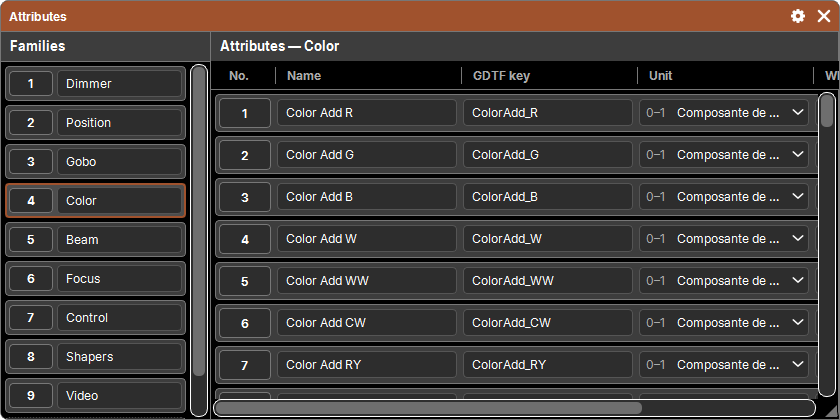
On the left, the list of Families; on the right, the Attributes of the family shown, as a table. A tap on a family (with no pad action) shows it. The family shown and the column widths are remembered with the window.
| Column | Purpose |
|---|---|
| No. | the attribute's place in its family; it is the pad object (Delete) |
| Name | the name shown everywhere; typed directly |
| GDTF key | the attribute's name in the GDTF standard (Pan, ColorAdd_R, Gobo1…): it is what matches the attribute to GDTF files; empty ("custom") for an attribute of your own |
| Unit | the physical unit of its values (fixed list, see below) |
| Wheel | No, Color or Image: what its predefined values carry |
| Base value | a value that replaces the profiles' default for all fixtures; empty: each profile's default |
Units
| Symbol | Unit | GDTF key |
|---|---|---|
| — | None | None |
| % | Percentage | Percent |
| ° | Angle | Angle |
| °/s | Angular speed | AngularSpeed |
| Hz | Frequency | Frequency |
| s | Time | Time |
| K | Temperature | Temperature |
| m | Length | Length |
| nm | Wavelength | WaveLength |
| cd | Luminous intensity | LuminousIntensity |
| 0–1 | Color component | ColorComponent |
Wheel
- Color: the attribute's predefined values carry a color (color wheel). In profiles, each value gets a color swatch; in the Programmer, the value tiles show that color.
- Image: the values carry an image (gobo wheel, animation wheel). Profiles and the Programmer show the thumbnail.
- No: nothing drawn, only the value's name.
Base value
The base value forces a default on all fixtures that have the attribute, whatever their profile. The common example: a Dimmer at 0, so that no fixture lights up by itself when patched (virtual dimmers included).
- It is typed in the unit shown: in % for an attribute in %, in degrees for an angle (
50,50 %,-90°, comma or point). - Clearing the field goes back to each profile's default.
Adding a family or an attribute
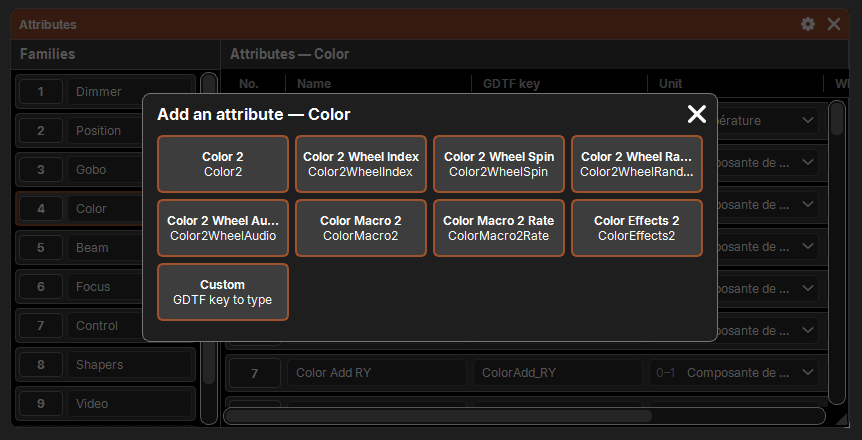
- + New family, at the bottom of the family list, creates a family of your own. Rename it in its field.
- + Add an attribute, at the bottom of the table, opens a grid Add an attribute — Family:
- the official attributes of the family that are not there yet, with their name, key and unit filled in; for a numbered attribute, the first free number (Gobo 2 if Gobo 1 exists);
- Custom: a New attribute with no key, to name and set up yourself.
The added attribute is brought into view, ready to be renamed.
Renaming, editing, deleting
- Name, GDTF key and base value are typed in their cell; unit and wheel are picked from their list. A refused value goes back to the previous one.
- An attribute always keeps a name: an empty name is refused.
- Delete: Delete then a tap on the number of a family (it goes with all its attributes) or of an attribute. With a selection, the whole selection is deleted (see lists).
- No Copy or Move: families and attributes are created here, in catalog order.
All changes go through the history: Undo reverts them.
Profile-specific attributes
A GDTF file can contain attributes that are not in the standard ("Pan Invert", "LED Frequency"…). They do not clutter the library: they stay specific to their profile, with the family given by the file, and are shown in that profile only. The show keeps their list for its patched fixtures.
Names in English
The English interface shows, for an official attribute, its GDTF name as separate words ("PanRotate" → Pan Rotate, "Gobo1WheelSpin" → Gobo 1 Wheel Spin). An attribute you have renamed keeps your name in both languages. Nothing is changed in the library: you can switch from one language to the other without losing anything.