
Lists, tables and objects
Almost everything in E&S Lighting is a numbered object: a cue, a Cue List, a group, a preset, a view, an Action… Windows show them in two ways, with the same gestures everywhere.
Cards
A list (Cue List, Shows, Windows, Profiles…) is made of cards, sorted by number. A card has:
- a number button: this is the object, for the command pad. Without an action, it does the normal job of the object (open the show, select the cue…); with an action lit on the pad, it receives it (Delete, Copy…);
- a name, typed directly in the card. It is saved as soon as you confirm (Enter or by leaving the field).
Tables (cues, profile channels, Patch, DMX Output…) are cards with several columns, with their titles above.
Tiles
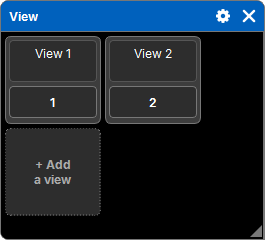
Pools (Views, Groups, Presets, Actions, Images…) show their objects as tiles, in a grid: a square with the number, and the name underneath, on two lines, typed directly. The grid arranges itself according to the window width.
Adding
The last card (or the last tile) is + Add…: it creates the next object, after the last one, without a popup. You then name it in its card. An addition never fills a gap in the numbering: it always goes after the last one.
Columns
- Width: drag the handle on the right of a column title. Widths are kept with the window (and in Views).
- The whole column: in several tables, pressing the title selects the whole column (see Selecting).
- Sorting: in the Fixtures window, pressing the title of No., Address or Profile sorts the rows: ascending, then descending, then the original order. An arrow shows the direction.
A table too wide for its window scrolls horizontally; the titles follow.
Delete, Copy, Move
The same sequence applies to every list and every pool.
Delete
- Delete then an object: it is deleted. If the object is part of the selection, the whole selection is.
- Or: select first, Delete, then Enter.
Copy and Move
- Copy (or Move), then an object: this is the source. If it is part of the selection, the whole selection is the source. The command line writes it: "Copy 3 views".
- Then press the target: the source arrives there.
Or: select first, then Copy: the selection immediately becomes the source.
- Enter instead of a target: the source arrives after the last object of the list.
- Copied objects keep their gaps: cues 1, 1.1 and 2 copied to 5 arrive at 5, 5.1 and 6.
- The target must be in the same list as the source.
- For cues, you can also type the target: Copy, a cue, Cue 7 Enter.
- Profiles have no number: Copy then a profile (or Enter) makes a copy of it, "(copy)".
Replace, Merge, Append
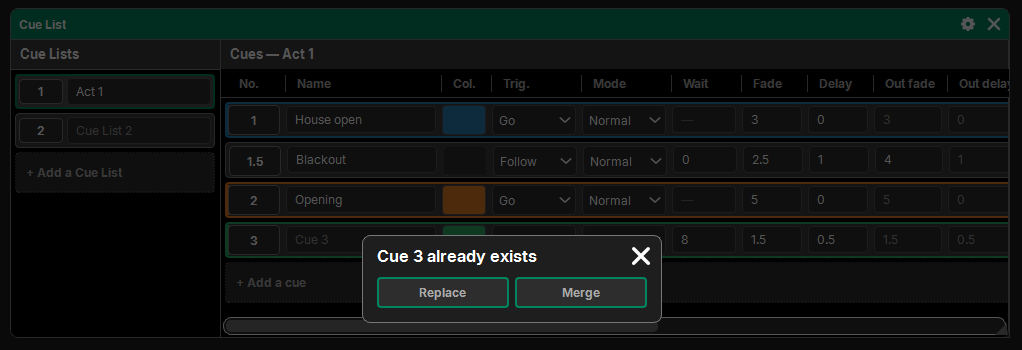
If objects already exist where the source arrives, a question opens:
| Choice | Effect |
|---|---|
| Replace | the source replaces the objects that were there |
| Merge | the source is added to what was there (cues only: their values merge) |
| Append | the source arrives right after the target; if those numbers are taken, all the following objects are shifted to make room |
The cross of the question cancels. Arriving on a free number asks nothing.
The whole operation is a single history entry: one Undo undoes all of it.
Drop-down list
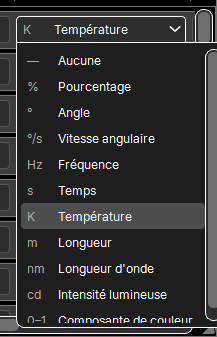
Choices (a mode, a unit, a network interface…) are drop-down lists:
- the list opens below the cell (or above, if there is no room) and stays inside its window; when longer, it scrolls by dragging;
- the wheel only changes the value if the list is open: scrolling a table never changes anything by accident;
- on a selected cell, the choice applies to the whole selection.
Popups
A question or a setting opens as a popup over the window it comes from: only that window is veiled, the pad and the other windows stay usable (for example to type a value). A popup too big for its window takes the whole screen. The cross closes the popup; for a question, it cancels.