
Worlds
A World limits what the programmer can touch to a set of fixtures, as on grandMA. Useful when several people program different parts of a big show, or to avoid touching the front by mistake while adjusting the backlight.
The Worlds window
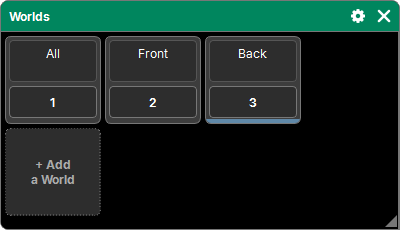
"Add a window" → Programming → Worlds. Worlds are shown as tiles, like groups. The active World is marked by its band.
- 1 · All: all fixtures. It is active at the start, and can be neither modified nor deleted.
- A tap on a tile makes that World active.
Creating a World
- "+ Add a World": a new World with the current selection.
- Store then a World: the selection goes into it, Replace or Merge (the cross cancels). All is refused.
- Assign, a group, then a World (or "+ Add a World"): the World takes the group's fixtures.
Delete, Copy and Move follow the common procedure (see The lists). All can be copied (its fixtures at that moment) but not deleted. Deleting the active World makes All active.
What a World limits
A World only affects the Programmer and the Layouts:
- a fixture outside the World cannot be selected;
- what it had in the programmer (values, effects, place in the selection) is set aside: nothing is output from it any more, and nothing from it goes into a store. Everything comes back as soon as a World contains it again, unless a Clear has emptied the programmer in the meantime;
- in a Layout, fixtures outside the World are shown faded (their opacity is set in the Layout's gear).
Playback is not affected: Cue Lists, Faders and Buttons play all fixtures, whatever the active World.
A sub-fixture belongs to a World along with its fixture.
Good to know
- The active World is a state of the moment, like the programmer: it is not in the history, and when a show is opened, All is active.
- The Worlds themselves are saved in the show.
- World tiles can also be placed in a Layout; an Action can activate a World (see Actions).