
DMX Output
E&S Lighting sends DMX over the network, in Art-Net and sACN (E1.31). A node (or a fixture that receives the network directly) turns these frames into DMX on its outputs.
The DMX Output window ("Add a window" → Setup) has two categories at the top: Outputs (what is sent) and Nodes (what is seen on the network). The category shown and the column widths are remembered with the window. Outputs are saved in the show.
Outputs
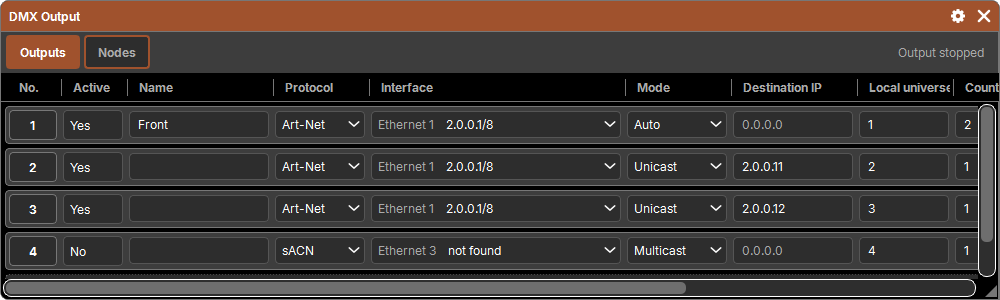
One row = a set of universes sent through one network card. Like grandMA's Art-Net and sACN tables combined: as many rows as you want (a single one in Auto is often enough; one per node in unicast on a large network).
| Column | Purpose |
|---|---|
| No. | the pad object (Delete, Copy, Move) |
| Active | Yes / No: an inactive output sends nothing |
| Name | free |
| Protocol | Art-Net or sACN |
| Interface | the network card that sends (see below) |
| Mode | Art-Net: Auto, Broadcast or Unicast; sACN: Multicast or Unicast |
| Destination IP | the node's address, in unicast only (grayed out otherwise); 0.0.0.0: the output sends nothing |
| Local universe | the first universe of the software (the one in the patch) sent by this row |
| Count | how many universes in sequence |
| Remote universe | the first universe on the network |
| Priority | sACN only: from 0 to 200, 100 by default |
| Preview | sACN only: preview data, for a visualizer (stage receivers ignore it) |
| Delay (ms) | a pause between two universes, from 0 to 100 ms, for old nodes that get overloaded |
+ Add an output adds one in sequence: like the last one (protocol, interface, mode), with its local and remote universes right after its own. The very first one goes out through the first card, in Auto, universe 1 to Art-Net universe 0. A new output starts inactive: set it up, then switch Active to Yes.
Remote universe
- Art-Net: as Net.Sub-Net.Universe (
0.1.3) or absolute (19= Net × 256 + Sub-Net × 16 + Universe), from 0 to 32,767. Both notations are accepted; the cell shows "0.1.3 (19)". - sACN: from 1 to 63,999.
Changing the protocol resets the remote universe to the start of its numbering (0 in Art-Net, 1 in sACN).
Modes
| Mode | What is sent |
|---|---|
| Auto (Art-Net) | each universe goes in unicast to the nodes that announce they output it; in broadcast if none is known (a node that does not answer ArtPolls must still receive) or if there are more than 40 |
| Broadcast (Art-Net) | all universes to the whole network; very common in live events, simple, but loads every device on the network |
| Unicast | to the Destination IP only |
| Multicast (sACN) | each universe to its multicast group: only subscribed receivers get it |
ArtSync (the synchronization of Art-Net universes) always goes in broadcast. An sACN universe that is no longer sent (output turned off, software closed) receives three stream-terminated packets: receivers release it at once.
Network interfaces
The Interface list only shows real cards, numbered by type with their address ("Ethernet 1 | 192.168.1.10/24", "Wi-Fi 1 | …"), then the loopback. Virtual cards (Hyper-V, VirtualBox, VMware, VPN, Docker…) are left out. A card plugged in while running appears by itself.
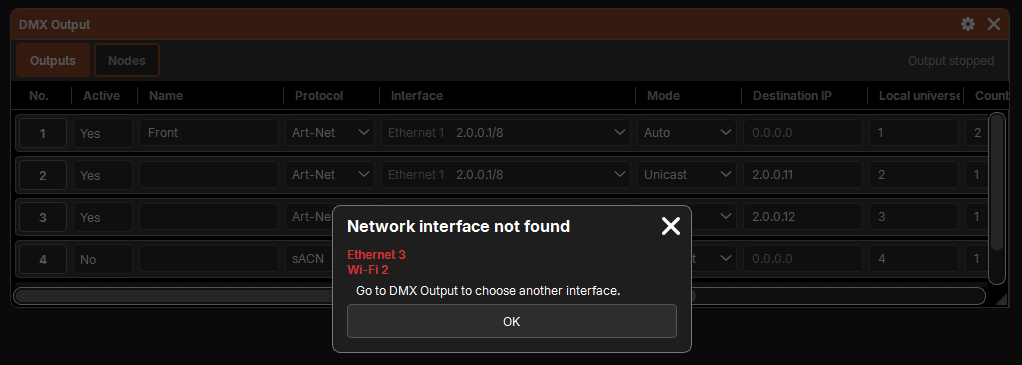
If an active output targets a card missing from the computer (a show from another machine, a card removed):
- at startup and when the show is opened, the Network interface not found popup reports it and invites you to choose another card here;
- the row keeps its card, shown not found, and sends nothing while it is missing.
Which universes are sent
Only universes where at least one fixture is patched are sent: there is no need to set up empty universes. The engine sends 44 frames per second.
Selection and sequential entry
Cells are selected as everywhere (a rectangle, or a title for the whole column; see selection). Then a value typed in the command line and Enter:
- Destination IP: in sequence (
192.168.1.11gives .11, .12, .13… in selection order); - Local universe and Remote universe: in sequence, each output starting after the universes of the previous one;
- Count, Priority, Delay: the same value everywhere.
A choice (Active, Protocol, Interface, Mode, Preview) made in a selected cell applies to the whole selection.
Nodes
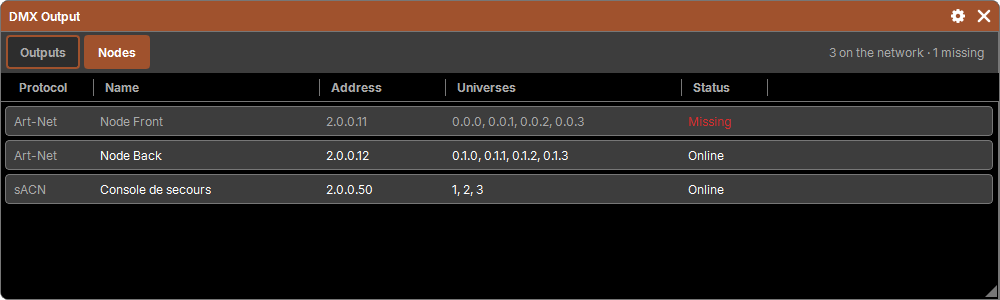
The Nodes category shows what the software sees on the network; nothing is set here.
- Art-Net: an ArtPoll every 2.75 s; each node that answers is listed with its name, its address and its universes (as Net.Sub-Net.Universe). With no answer for 10 s, it stays listed, marked Missing, and is no longer served by Auto mode.
- sACN: the sources on the network, discovered through Universe Discovery (every 10 s).
- Discovery only runs on the interfaces of active outputs, so as not to send anything on a network that is not yours. With no active output, the list stays empty, and the summary says so.
- If another program already uses the Art-Net port (6454), the summary says so: nodes cannot be detected.
What the engine does
At the end of the bar (Outputs category), the engine says what it is doing: "Frame: 0.4 ms · send 0.1 ms · 6 universes · 12 sends · 6 calculator(s)", and the skipped frames if any. Output stopped: the engine is not running; No universe sent: nothing is patched, or no output is active.
The calculation runs apart from the interface, on all processor cores but two: the screen can lag without the light stuttering.
Big shows
The software limits nothing: no limit on universes or fixtures. If the computer cannot keep up (frames are skipped, repeatedly), the command line says it once: "DMX Output: the computer cannot keep up, frames are skipped". Nothing is cut; look at the timings in this window, and lighten the load (fewer universes per output in broadcast, unicast or Auto rather than broadcast, a more powerful computer).
Not yet: RDM and merging several consoles.