
Recipes
A cue keeps its values, but also how they were made: these are its recipes (the Recipes of grandMA3, made automatically here). When a group changes (a fixture added, removed, moved in its grid), the cues that use it can be rebaked: their values are remade for today's fixtures, without storing everything again.
What a recipe remembers
Each gesture made in the programmer on a selection that came from a group (or from the fixtures of a preset recalled without a selection) makes a recipe line:
- "Group 1 → Color 4 · Red": a recalled preset;
- "Group 2 → Dimmer 0 thru 100": a typed value, spread according to the Fan and the Pattern;
- "Group 3 → Open": a ready-made value from the profile;
- "Group 1 + Group 3 except 105 → …": a selection of several groups, minus a fixture removed by hand;
- an effect given or adjusted (its effect line is kept).
The line also remembers how the selection was arranged in the selection grid (see Programmer; the order of the groups, the shuffle, a grid adjusted by hand) and the Pattern. One line per gesture, never per fixture: a show stays light.
A selection made by hand (fixture by fixture, on the pad, in a Layout) makes no recipe: its values stay as stored.
The programmer's recipe log starts again from zero at each Clear.
In the Cue List
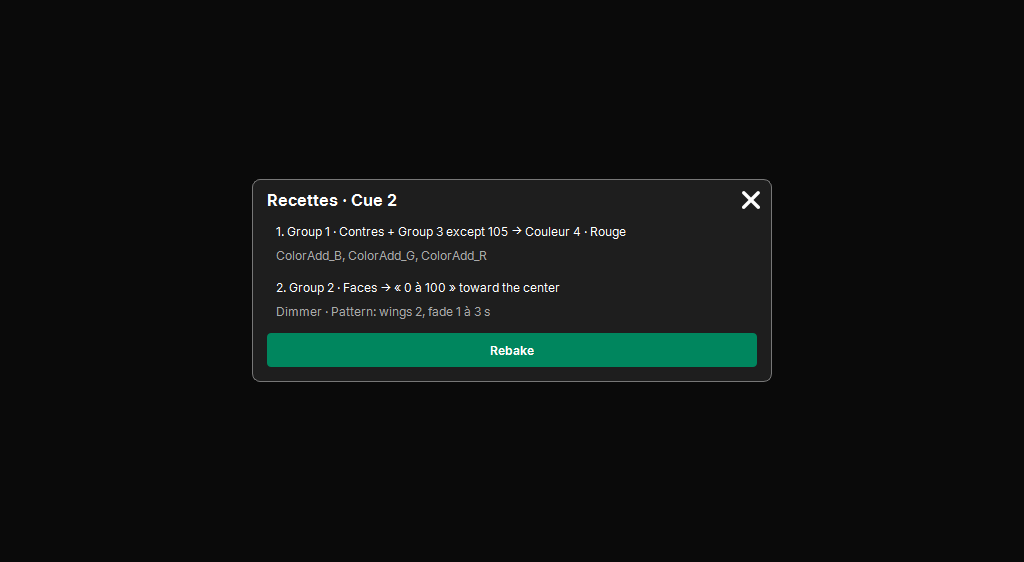
When storing, the cue keeps the recipe lines its values come from (see Storing cues):
- Replace: the programmer's lines replace its own;
- Merge and Update: the programmer's lines are added at the end; an identical line is not doubled;
- Remove: what leaves the cue also leaves its recipe (a rebake will not put it back).
The Recipes column of the cue table summarizes them. It turns orange when the cue needs rebaking (one of its groups has changed). A tap on it opens the Recipes · Cue … popup: all its lines in order, each in one sentence, then the details in a lighter style (its attributes, its Pattern, the adjusted or shuffled grid, the fixtures removed from the cue). The Rebake button redoes it at once.
Rebaking a cue
Rebaking replays each recipe line of the cue in a working programmer, with today's groups and presets, then puts the result into the cue. The rules, as on grandMA:
- a value made by hand on the same cell wins: the rebake does not touch it;
- a fixture removed from the cue (Remove) does not come back;
- a fixture that left the group leaves the cue; a fixture added to the group receives its value;
- what does not change the state before the cue does not stay in it (tracking);
- an effect already there keeps its content, its place follows the new grid;
- a line whose group has been deleted is ignored: its values stay.
The result is shown in the command line: "3 values added, 1 value removed", "already up to date"… Rebaking is a history step: Undo undoes it.
The Recipes window
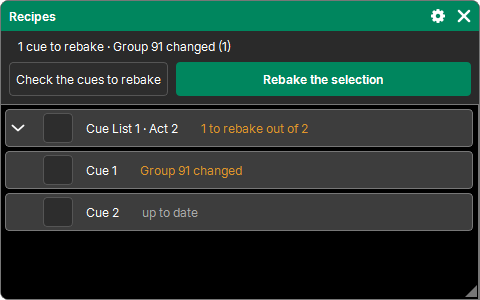
"Add a window" → Programming → Recipes goes through the whole show:
- the Cue Lists that have recipes, each followed by its cues (an arrow expands it);
- the state of each cue: to rebake (in orange, with the cause: "Group 9 changed"), to check (stored before groups were tracked, or group deleted), or up to date;
- a checkbox per cue; checking a Cue List checks all its cues;
- Check the cues to rebake checks at once all those that need it;
- Rebake the selection rebakes them all, with a progress bar; Cancel stops it partway. The whole thing is a single history step. A cue changed in the meantime is left as it is (the message says so).
The checked boxes and the expanded Cue Lists are shared by all open Recipes windows.