
Presets
A preset keeps values (and effects) of an attribute family, fixture by fixture: a color, a position, a gobo… You recall it with a tap, and the cues that use it stay readable. As on grandMA, there is one preset pool per family.
The preset windows
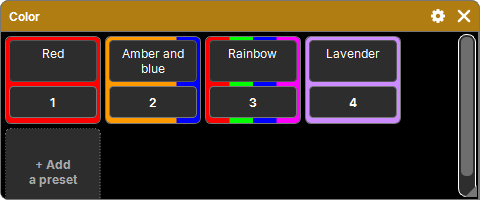
"Add a window" → Presets offers one window per family of the patched fixtures: Dimmer, Position, Color, Gobo, Beam… (families specific to some profiles included). Each window is titled with just its family name.
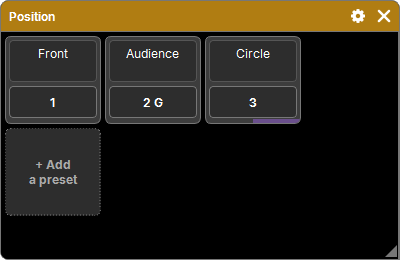
Presets are shown as tiles, sorted by number: the name (typed directly) and the number square. "+ Add a preset" creates one with what is active in the programmer.
Families and attributes are referred to by their GDTF key, not by a number specific to the machine: a show stays usable on another computer.
Storing a preset
- Set the values (and effects) of the family in the programmer.
- Store, then a tap on the preset (or its number).
- If the preset already exists: Replace, Merge (the new values are added to its own or replace them), or Remove (the selected values are taken out, offered only if one of them is in it). The cross cancels.
Only the active values of the pool's family are stored: a color preset never takes the position. With nothing active in the family, nothing is stored (message in the command line).
The preset also keeps each fixture's cell in the selection grid.
Recalling a preset
A tap on the preset's square gives its values and effects to the selected fixtures. What they receive depends on its mode:
| Mode | Recall |
|---|---|
| Selective (default) | each selected fixture that is in the preset gets its own value back. With no selection, the preset's fixtures are selected first, with its grid |
| Global ("G" on the square) | any selected fixture that has the attribute receives the value of the first stored fixture: in its function if it has the same profile and mode, otherwise converted, limited to its range |
A long press on the preset opens the mode choice. Values are always kept per fixture: changing mode loses nothing.
Recalled values keep their link to the preset: the Programmer tile shows the preset's name, and if the preset changes, the programmer values that come from it follow.
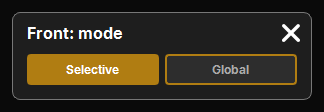
Two presets on the same attributes
In the programmer, a cell (fixture, attribute) has only one value: recalling a preset replaces the previous one's for the fixtures it receives. A color preset recalled after another one therefore takes its place on all the fixtures it covers; the fixtures it does not cover keep their previous value.
- Selection empty between the two recalls: the second preset selects its fixtures and sets them all.
- Selection kept: only the selected fixtures change.
Removing a preset from the programmer
Off then a preset: everything that comes from it (values and effects) leaves the programmer.
What the tiles show
- Color pool: the tile background shows the colors the preset gives, in bands proportional to the number of fixtures of each color (Global: the color of the first fixture). The color is calculated from each fixture's real mix (emitters and filters read from the GDTF, color wheel).
- Preset sent: as long as the programmer keeps active values that come from it, a band at the bottom of its tile, in the programming color. Clear (values deactivated or emptied) removes it.
- Preset with effects: its band is always there, dull purple, and bright purple when its effects are sent.
- Values and effects together: the band is in two parts, values on the left, effects on the right.
Presets and effects
A preset also keeps the active effects of its family, in full (steps, speed, Pattern…). Recalled, the effect comes back to the selected fixtures; in Global mode, the effect of the first fixture applies to all. See Effects.
In the Programmer's Effect mode, a tapped preset is not sent: it becomes the current step of the selection's effects ("‹ Step 2 ›"). The effect then follows the preset if it changes.
Updating: Update
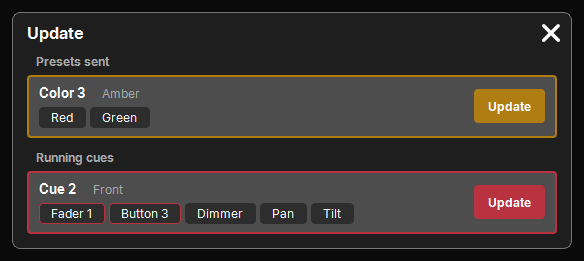
Update (grandMA's Update) updates what is in play with what you have just retouched in the programmer. A popup of cards offers:
- the presets sent that active values or effects come from (a value retouched by hand also counts if the preset contains its cell);
- then the current cue of each running Cue List.
Each card shows its title ("Color 3 · Red"), the attributes that change, and Update, which does the store (one history entry) and closes the popup. Only the cells the target already has are updated.
Delete, copy, move
Delete, Copy and Move follow the common procedure: see The lists. The presets of a family that leaves the patch stay in the show.
Preset tiles can also be placed in a Layout (see Layout), and an Action can recall, turn off, store or name a preset (see Actions).