
Park
Park freezes fixtures, as on grandMA: they stay exactly at what was being output when you parked them, all their attributes, whatever happens next. Useful to keep a profile on during a focus, or to lock a faulty fixture.
Parking
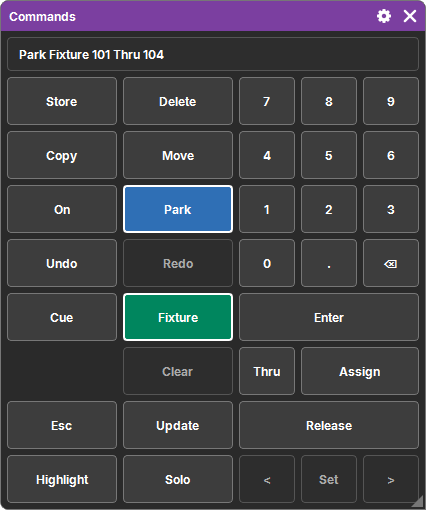
On the command keypad, two quick taps on Off: the command line shows Park. Then, as you prefer:
- "Fixture 1 Thru 5" then Enter: these fixtures;
- Enter directly: the fixtures selected in the programmer;
- two quick taps on Fixture ("Park Selection") then Enter: the selection too.
A sub-fixture parks its whole fixture, head and sub-fixtures included.
Releasing: Unpark
Two quick taps on On: the command line shows Unpark, then the same ways of designating the fixtures. They immediately take back what the Cue Lists and the programmer give them.
What Park does
- A parked fixture is output frozen: nothing goes above it, neither a Cue List, nor the programmer, nor a Cue List with Super priority.
- Its values are the ones that were being output at the time of the Park, attribute by attribute.
Where to see it
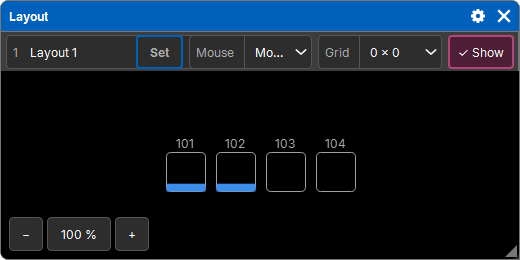
- in the Layouts: a blue band at the bottom of the fixture's square (see Layout);
- in the Fixtures window: a blue band under its number, and its values in blue (see Fixtures).
History and show
Park and Unpark are history entries ("Park Fixture 1 Thru 5"): Undo cancels them. Parked fixtures are saved in the show: they stay parked when it is reopened.
If none of the targeted fixtures is patched (or, for Unpark, none is parked), nothing happens.