
The Pattern
The Pattern is the equivalent of grandMA3's MAtricks: it defines how a value range, an effect offset or times are distributed over the selection. There is only one Pattern, shared by the selection and the effects: the effect editor is just a shortcut to it.
Opening the Pattern
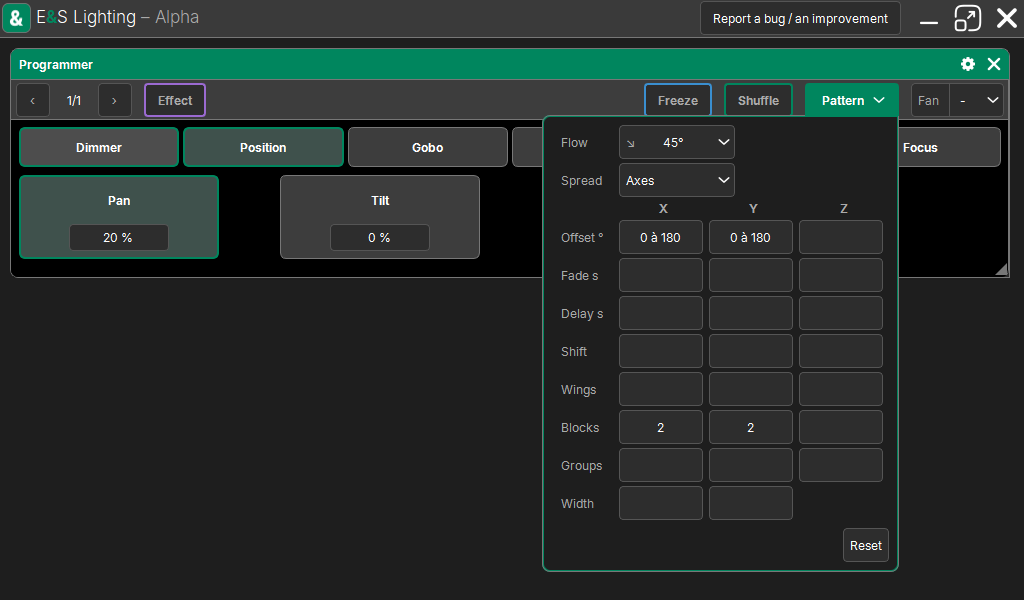
In the Programmer window, the Pattern button (between Shuffle and Fan) opens a panel under it. The button is lit when a Pattern is set. A tap outside the panel, or Esc, closes it.
The panel shows the Pattern table, then Reset, which clears it.
Flow and Spread
At the top of the table:
- Flow, the shortcut: Reading, the 8 arrows (→ left to right, ↓ top to bottom, ↘ diagonally…), Center (from the center to the edges), Edges (from the edges to the center), and the 3D directions for volume shapes. "Axis by axis" is shown when the setting matches no shortcut. A direction chosen with no offset takes a full turn, "0 to 360".
- Spread: how the selection grid is traversed.
| Spread | Traversal |
|---|---|
| Reading | a single counter, cell by cell, row by row (like grandMA2) |
| Axes | X, Y and Z each have their own setting; their offsets add up (like grandMA3) |
| Radius | from the center of the grid to the edges, in a circle; Angle ° and Center at move the center (arcs) |
| Sphere, Cube, Diamond, Cylinder | volume shapes, from the center to the edges; Center Z sets the depth of the center |
The table: one column per axis
One column per axis (X, Y, Z), one row per setting. An empty field: none. In Reading and Radius, only the X column counts (a single counter); Width always applies.
| Setting | What it does |
|---|---|
| Offset ° | the "from to" offset (the From-To Phase): "0 to 360" spreads a full turn along the axis |
| Fade s | a "from to" fade time per fixture, in seconds |
| Delay s | a "from to" delay per fixture, in seconds |
| Shift | the pattern slides by N cells (negative: the other way), looping |
| Wings | the axis split into N parts, each mirroring the previous one |
| Blocks | N consecutive cells act as one |
| Groups | the pattern repeated every N cells |
| Width | the row cut every N cells, continuing on the next row (X wraps onto Y, Y onto Z): to make a grid out of a simple row |
Example: 12 fixtures in a line, Offset "0 to 360" and Wings 2 on X: an effect starts from both edges at the same time and meets in the center.
Value ranges follow the Pattern
A typed value "a Thru b" follows the same wave as an effect: the fixture that would start first gets a, the last one b. With the → direction a whole column gets the same value; with ↘ diagonally; with Center, from the center to the edges. With no offset set, the range is spread cell by cell with the X settings.
With several points, "0 Thru 100 Thru 0", the values are distributed at equal distances (a bump). The Fan keeps its direction on top.
Per-fixture fades and delays
Fade s and Delay s give each fixture its own time, spread like the offset (Shift, Wings, Blocks, Groups apply; in Axes, the axes add up).
- A value set in the programmer takes its fixture's time. In the programmer, it changes immediately: the time only matters for the cue.
- The cue keeps this time with the value, per fixture and per attribute. On Go, it takes precedence over the family time, which takes precedence over the cue time; the cue duration takes it into account.
- The Cue List shows the range of these times in its Fade and Delay columns.
- Changing the Pattern afterwards does not touch values already set.
The Pattern and effects
- Each effect line keeps a copy of the Pattern: a cue or a preset keeps the result.
- When the Pattern changes (the panel, an effect line, the Phase or the Flow of the band), all the effects of the selected fixtures take it at once, all families. Those of other fixtures and of cues keep their copy.
- A ready-made shape gives its own to the Pattern if it is empty (the Wave: 0 to 360).
See Effects.
What the Pattern is not
- It is not saved in the show and does not go through the history: it is a programmer setting.
- A new selection does not touch it; Clear releases it on the first step, with the selection (effects already set keep theirs).