
Clock
The Clock window (Display category), like Clock on grandMA, shows a time in large digits, at the size of the window: the computer's time or a timecode. It is also used to control the Internal timecode.
What it shows
A list, at the top, chooses the source:
| Source | Display |
|---|---|
| Current time | the computer's time, HH:MM:SS |
| Internal | the software's Internal timecode, HH:MM:SS:FF |
| a Time input | the timecode received on that input (see Timecode) |
As long as there is no timecode (silent input, Internal stopped), the clock shows - : - : - : -. An input deleted since shows "… not found".
The text takes all the available space, in width or height; the digits all have the same width, so the size does not jump from one frame to the next.
The source and the text color (in the window's gear) are remembered with the window, and in Views. Several clocks can show different sources.
The Internal timecode
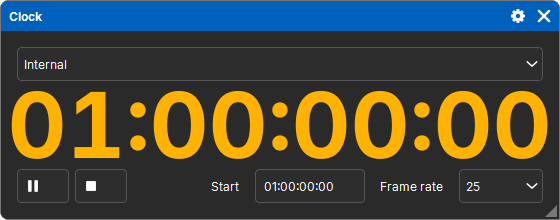
The software has its own timecode, the Internal one: it counts time from Play, starting at a start time. It serves as a source for Timecodes without plugging anything in: to rehearse a show timed to the clock, or for a show that runs on its own.
When the clock shows Internal, its controls appear:
| Control | Effect |
|---|---|
| Play | time runs; the button becomes Pause |
| Pause | time stops where it is; Play starts it again from there |
| Stop | no more timecode; the next Play starts again from the start time |
| Start | the start time, HH:MM:SS:FF |
| Frame rate | 24, 25, 29.97 or 30 frames per second |
- There is only one Internal timecode: all clocks control it together.
- The start time and the frame rate are kept in the show. Playback, however, is the current state: when the show opens, the Internal timecode is stopped.
- Starting again with Play only triggers the Timecode lines at the exact start instant, not those before it (see Timecode).