
Groups
A group is a stored selection of fixtures, in its order and with its grid, as on grandMA. It is used to reselect with a tap ("the front profiles", "the back washes"), to carry an intensity Master and to define a World.
The Groups window
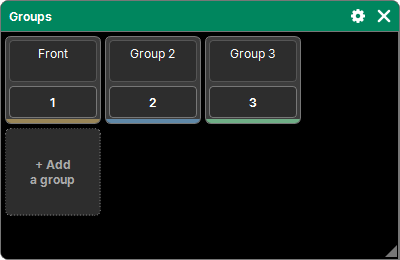
"Add a window" → Programming → Groups. Groups are shown as tiles, sorted by number:
- the name on two lines, typed directly;
- the number square, used as the object for the command keypad;
- "+ Add a group", the last tile, creates a new group with the current selection.
Recalling a group
A tap on a group selects its fixtures, in its order and with its grid (see the Grid). The selection rule applies: as long as no value has changed, the selection adds to the previous one.
A fixture removed from the patch stays in the group: it is ignored on recall and comes back if it is repatched.
The bottom band
A band at the bottom of the tile shows how much of the group the current selection covers, however it was made (the group, fixture by fixture, a range from the keypad…):
| Band | Meaning |
|---|---|
| sand | some of the group's fixtures are selected |
| blue-gray | all of them, but in a different order |
| green-gray | all of them, in the group's order |
| none | no fixture of the group is selected |
Extra selected fixtures do not count.
Storing a group
- Select the fixtures, in the order you want.
- Store, then a tap on the group's tile (or type its number).
- If the group already exists, choose:
- Replace: it becomes the selection;
- Merge: the missing fixtures are added at the end (their grid, to the right of its own);
- Remove: the selected fixtures that are already in it are taken out (offered only if there are any). The cross cancels.
With no fixture selected, nothing is stored: a message says so in the command line.
"+ Add a group" does the same on a free number, without asking.
Delete, copy, move
Delete, Copy and Move follow the procedure common to all lists: see The lists. Everything goes through the history (Undo / Redo).
Elsewhere in the software
- Off then a group: its fixtures leave the programmer and the selection.
- A group can carry an intensity Master on a Fader or a Button: see Masters and Speed Masters.
- Assign, a group, then a World: the World takes the group's fixtures. See Worlds.
- Group tiles can also be placed in a Layout: see Layout.
- An Action can select, add, store or name a group: see Actions.
- The recipes of a cue remember the groups its values come from: see Recipes.
Groups are saved in the show.