
The Fixtures table
The Fixtures window ("Add a window" → Programming) shows all the fixtures in the patch and, for each one, what is actually output on each active attribute. It is the equivalent of grandMA's Fixture Sheet: you see at a glance who does what, and where each value comes from.
What it shows
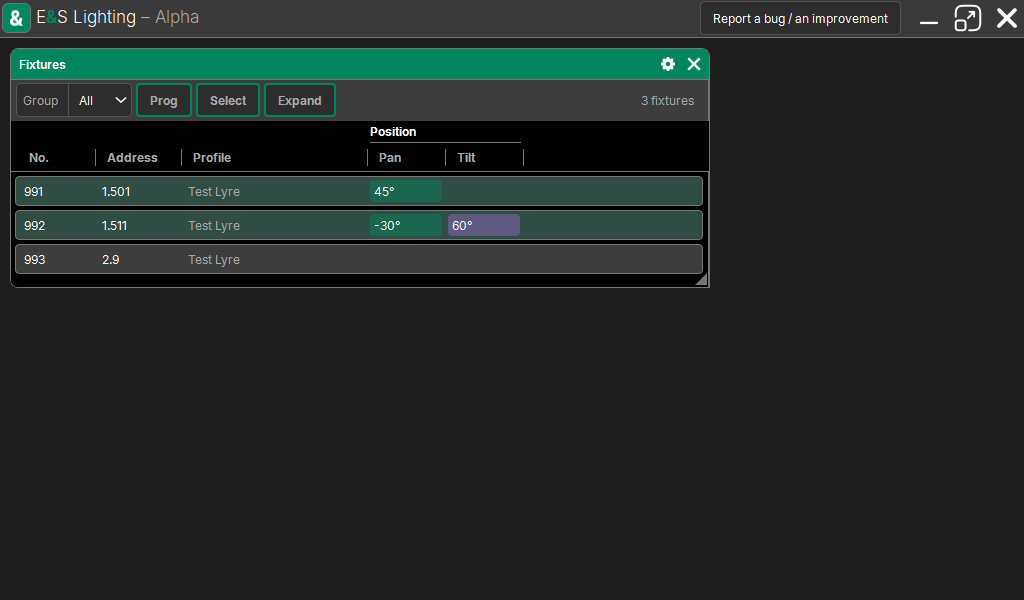
- On the left: the fixture's No., Address and Profile.
- Then one column per active attribute, sorted under the name of their family (Dimmer, Position, Color…), with a line under each family.
- An attribute is active when something is driving it right now: the Programmer, a Cue List in playback, an effect. Highlight does not count.
- The value shown is the one that is output (after priorities, fades, masters), updated continuously.
- The background of a cell takes the color of what drives it: the programmer, a Cue List, an effect; a parked fixture has its cells in blue, with a band under its number.
A column only appears if at least one fixture shown has that attribute active: the table stays readable even with hundreds of attributes in the show.
Sub-fixtures
A fixture that has sub-fixtures has an arrow in front of its number: a tap on this cell expands its instances below (101.1, 101.2…), indented, each with its values. Another tap collapses them.
The selection
Fixtures selected in the Programmer stand out (a tint in the programmer's color), their instances too. The table does not change the selection: it shows it.
The bar
At the top of the window:
| Element | Purpose |
|---|---|
| Group | only show the fixtures of a group; All at first: the whole patch |
| Prog | only the fixtures active in the programmer |
| Select | only the selected fixtures |
| Expand | expand all fixtures with sub-fixtures |
Sorting
A tap on the No., Address or Profile title sorts the table on that column (ascending, descending, then the original order). An attribute column does not sort: its value changes every frame.
The group, the filters, the sorting and the column widths are remembered with the window.
Big shows
The table is built for thousands of fixtures: only the rows on screen exist and are watched at the output. Scrolling costs nothing to the light calculation.