
Windows and Views
Two levels of windows:
- the main windows: one per screen ("Window 1", "Window 2"…), each with its header and its area;
- the windows you place in an area: Cue List, Programmer, Layout… (see The screen and windows).
A View keeps the window arrangement so you can recall it in one move.
Several screens: the Windows window
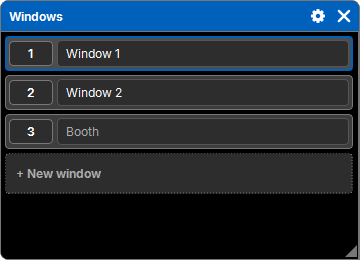
"Add a window" → Display → Windows lists the main windows of the show. The one holding the list is highlighted; windows that are off have their name dimmed.
| Gesture | Effect |
|---|---|
| + New window | adds a main window, switched on, "Window N"; place it on the screen you want |
| press a window's button | brings it to the front (and switches it on if it was off) |
| On / Off then a window | switches it on / off |
| Delete then a window | deletes it, with its windows |
| type in its name | renames it; the name shows in its header |
- Window 1 is always there and always on: it cannot be switched off or deleted. Closing it (cross in the header) quits the software.
- Closing another main window with its cross only switches it off.
- A window that is off is hidden but keeps its windows: switched back on, it finds them again.
- Each main window remembers its place: the screen (monitor), the position, the size, maximized or full screen. It goes back there when the show opens. A new window (or a window whose screen was unplugged) goes by default to the monitor with the same number if it exists, centered.
Main windows are part of the show: switching on, off, renaming or deleting goes through the history.
The current arrangement
Open windows, their place, their size and their settings (column widths, filters, Clock color…) are kept in the show at all times: on reopening, everything comes back as you left it. This is not a View, and it does not go into the history.
Views
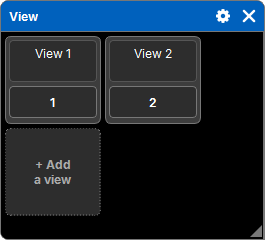
"Add a window" → Display → View shows the views as tiles, sorted by number.
| Gesture | Effect |
|---|---|
| press a view | recalls it: the windows of its screens are replaced by its own |
| + Add a view | stores the current arrangement into a new view, at the end |
| Store then a view | stores the current arrangement into it; if it exists, a question offers Replace or Append (a new view right after) |
| Delete, Copy, Move | the common sequence (see Lists, tables and objects) |
| type in its name | renames it |
A view keeps, for each window: its type, its place, its size and its settings.
A view's screens
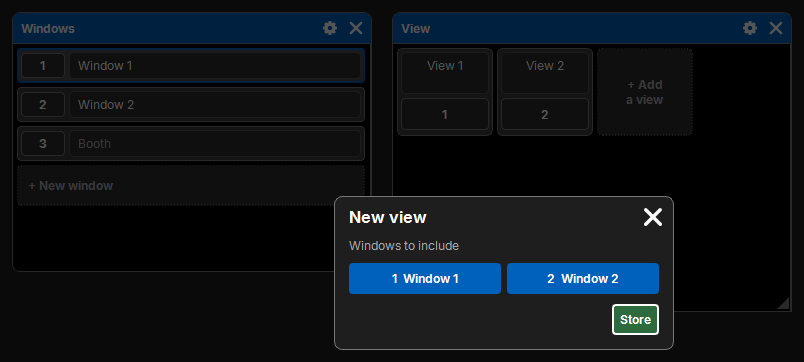
A view keeps the screens it includes and, when recalled, replaces only those: the other screens do not move. You can thus have views for the programming screen, and others for the playback screen.
- With a single main window on, a view includes that screen.
- With several main windows on, storing opens Windows to include: one key per window that is on, all pressed by default; release those not to include, then Store. The cross cancels.
- A window that is off is never included.
Views are part of the show: storing, renaming or deleting them goes through the history. A view can also be placed in a Layout, to recall it from a lighting plot.