
DMX Input
DMX Input lets DMX received from the network trigger something in E&S Lighting: raise a Fader from another console, fire a cue from a DMX button, run an Action… It is the equivalent of grandMA3's DMX Remotes. Nothing that is received goes back out.
The DMX Input window ("Add a window" → Setup) has two categories at the top, remembered with the window:
- Inputs: what is listened to, and what actually arrives;
- Actions: what it triggers, and what each channel receives.
Settings are saved in the show and go through the history; triggers do not (like a tap by hand).
Inputs
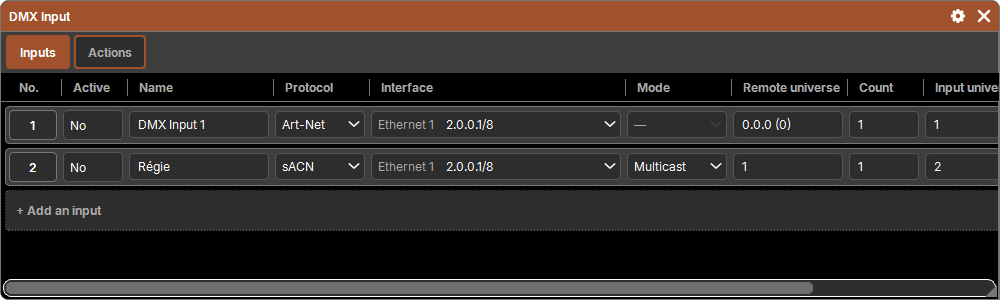
One row = universes listened to on a network card, received under a separate numbering: the input universes, unrelated to the patch.
| Column | Purpose |
|---|---|
| No. | the pad object (Delete, Copy, Move) |
| Active | Yes / No |
| Name | "DMX Input 1" by default |
| Protocol | Art-Net or sACN |
| Interface | the network card that listens (as in DMX Output); a missing card stays shown, "not found" |
| Mode | sACN: Multicast (subscribe to each universe's group) or Unicast (receive what is sent directly to the computer); Art-Net: nothing to choose |
| Remote universe | the first universe received from the network (Art-Net: Net.Sub-Net.Universe or absolute, from 0; sACN: from 1) |
| Count | how many universes in sequence |
| Input universe | the number under which the first one is received (from 1 to 63,999) |
| Status | what arrives: "Received from 192.168.1.20" ("+1" if there are other sources), No signal, or "—" for an inactive input |
+ Add an input adds one after the last one (same settings, universes right after); it starts inactive, like an output.
Several sources
- sACN: the highest priority wins; on a tie, the highest value of each channel.
- Art-Net: the highest value of each channel.
- A source that goes silent is forgotten after 10 s in Art-Net, 2.5 s in sACN, or as soon as its stream ends.
- sACN Preview data is ignored.
The software's replies to ArtPolls announce the universes it listens to: a console in unicast (or in Auto) knows where to send them.
Actions
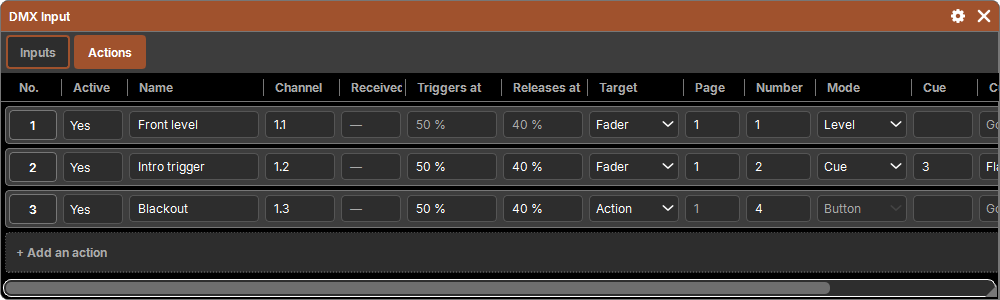
One row = a channel listened to and what it triggers.
| Column | Purpose |
|---|---|
| No. | the pad object |
| Active | Yes / No |
| Name | free |
| Channel | input universe.channel: 1.12 = input universe 1, channel 12 (8 bit) |
| Received | what the channel receives, in %; "—" with no signal |
| Triggers at | the press threshold, 50 % by default |
| Releases at | the release threshold, 40 % by default |
| Target | Fader, Button or Action |
| Page | the page of the Fader or Button |
| Number | the number of the Fader, Button or Action |
| Mode | Level, Button or Cue |
| Cue | the cue to send (Cue mode) |
| Cue mode | Go, Flash, Temp or Toggle (Cue mode) |
| Return to | Previous cue or Off: where the Cue List goes back to on release (except in Go) |
Only the useful cells stay active: Level has no thresholds, an Action has neither page nor mode, the cue mode only exists in Cue mode.
+ Add an action adds one after the last one, on the next channel.
The page is fixed
The target is a Fader or a Button on a given page: changing page on the Faders and Buttons does not change what the DMX triggers.
The three modes
- Level (Fader): the channel is the Fader's level. It only applies when the received value changes: you can still move the Fader by hand between two movements of the channel. A Button has no level.
- Button: the channel goes above Triggers at: the button is pressed, with its function (Go, Flash, Temp…); it goes back below Releases at: released.
- Cue: the same, but sends a specific cue of the Fader's or Button's Cue List, in Go, Flash, Temp or Toggle, with its Return to (like a Custom square in a Layout).
The gap between the two thresholds prevents a channel hovering around one value from triggering over and over.
An Action target runs the pool's Action when the threshold is crossed.
No signal
No more signal, an action turned off, changed or removed: what it was holding pressed is released, so that a Flash does not stay on. A level, on the other hand, stays where it is.
Selection and sequential entry
As in DMX Output: a rectangle, or a column title for the whole column, then a typed value and Enter:
- what follows on goes in sequence: remote and input universe, channel, target number (
1.1,1.2,1.3…); - the rest takes the same value.
A choice (Active, Protocol, Target, Mode…) made in a selected cell applies to the whole selection.