
Storing cues
Storing means putting into a cue what is active in the programmer: the values and effects you have given to the fixtures (see Programmer). Values keep the preset they come from: the cue refers to it, and a preset changed later changes the cue.
As on grandMA, storing works in tracking: only the values that change the state of the Cue List just before the cue go into it. What is already on stage from the previous cues is not copied.
A new cue
Several ways, as you like:
| Gesture | Where the cue goes |
|---|---|
| + Add a cue (at the bottom of the cue table) | at the whole number following the last cue |
Store Cue 5 Enter | cue 5 of the active Cue List |
Store Cue 1.5 Enter | a decimal cue, between 1 and 2 |
| Store then the button of a Fader or a Button | a new cue at the end, in its Cue List (see below) |
The active Cue List is the last one shown in a Cue List window (a tap on it in the left column). Without an active Cue List, the command line says "No Cue List shown".
A new cue is created with what is active, even if nothing is (an empty cue).
Between two cues
A new cue slipped before an existing cue (for example 1.5 between 1 and 2) asks a question:
- Normal: the new cue plays in tracking, cue 2 and the following ones inherit what it changes;
- Cue Only: the new cue changes nothing for what follows. Cue 2 receives the old state of everything 1.5 changed.
This question is not asked if the Cue List is not in tracking, or if the next cue is in Break.
Storing into an existing cue
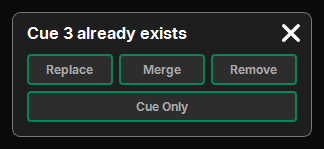
Store then the number of a cue that already has values: a popup asks what to do.
| Choice | Effect |
|---|---|
| Replace | its values and effects become those of the programmer |
| Merge | those of the programmer are added to it (same cell: the new value wins) |
| Remove | the same (fixture, attribute) pairs as in the programmer leave the cue; offered only if the cue has some |
The Cue Only switch, below these choices, protects what follows: the next cue receives the old state of what changes.
- With nothing active in the programmer, storing is refused ("no active value").
- A cue that is still empty is filled without a question.
- The popup's cross cancels.
A range of cues
Store Cue 3 Thru 7 Enter: the programmer goes into all existing cues from 3 to 7, each one compared with the state just before it. If one already has values, a single question applies to all (Replace, Merge, Remove, Cue Only). The whole thing is a single history step.
Only Store accepts a range of cues.
Storing on a Fader or a Button
Store then the button of a Fader or a Button:
- it holds a Cue List: a new cue is created at the end of that Cue List;
- it is free: a new Cue List is created, the programmer goes into its cue 1, and the Fader (or Button) receives it. All in one history step;
- it holds a Master or a Speed Master: refused ("it is not a Cue List").
The values' own times
If the programmer's Pattern gives times per fixture (spread fades or delays), each value keeps its time in the cue. It comes before the family's times and the cue's times (see Cue List).
Recipes
Along with the values, the cue keeps how they were made: "Group 1 → preset Red". If the group changes later, the cue can be redone (rebaked) for its new fixtures. See Recipes.
Update
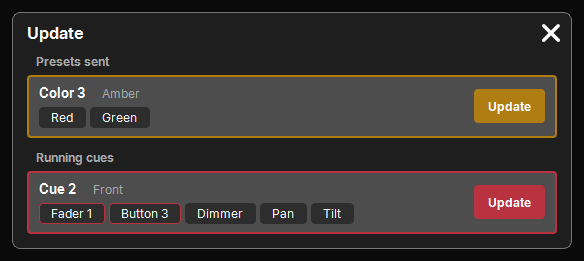
The pad's Update key updates what is in play with what is active in the programmer, like Update on grandMA. A popup lists the possible targets, one card each:
- first the presets sent to the programmer (an active value comes from them, even if changed since);
- then the current cue of each Cue List that is playing.
Each card says what the target is ("Color 3", "Cue 2" and its Cue List), the Faders or Buttons that hold it, and the attributes that change. Update applies it and closes the popup.
- Only the cells the target already has are updated: Update does not add new fixtures or attributes.
- In a cue, it is a Merge in tracking.
- A target with nothing to update is not offered; with no target at all, a message says so.
Delete, copy, move
Cues follow the common list sequence (see Delete, copy, move):
- Delete then a cue (or selected cues, then Enter): they are deleted. On the pad: Delete Cue
4Enter. - Copy or Move then a cue (the source), then Cue
NEnter: the cues arrive at N, keeping their spacing. A copied Cue List gets "(copy)" after its name. - If cues already occupy the destination, a popup asks:
- Replace: they are overwritten;
- Merge: the destination cue keeps its times, color, note and trigger, receives the incoming values, and its name becomes "old name + incoming name";
- Append: the cues arrive after the existing ones.
All of this is a single history step: Undo undoes the whole operation.